
Magic Zoom Plus4.0 - Download
You'll be able to download in few seconds.
Publisher Description
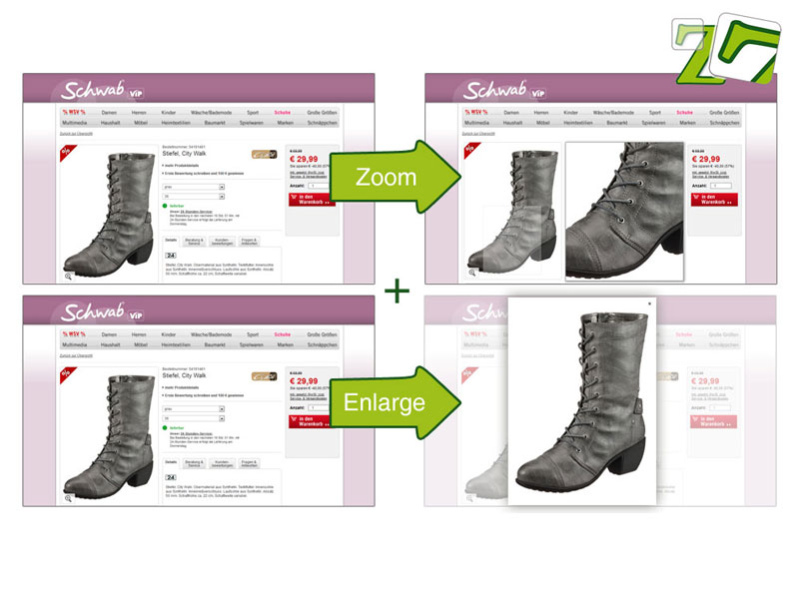
Looking for an awesome image zoomer that not only zooms-in but also enlarges to full-screen? Magic Zoom Plus is for you.
Whether you are a JavaScript novice or a coding ninja, Magic Zoom Plus is so easy to install on your website you'll be wondering why you haven't used it for years (heck it was released 5 years ago and is now on version 4.0).
Magic Zoom Plus combines two powerful zooms in one:
1. Hover over your image and a zoomed version will appear to the side, showing you the image in glorious detail.
2. Click the image and it enlarges to fill the webpage - perfect for iPads and smaller screens.
Follow the simple 5-step installation process - anyone can use Magic Zoom Plus with confidence.
With over 80 options, you can customise your Magic Zoom Plus precisely how you want it. There really is no limit to what you can change, whether it's the position, size, borders or zoom effects, the list goes on and on.
It goes without saying that Magic Zoom Plus works on iPhone, iPad and Android devices as well as every major browser, so everyone can enjoy your gorgeous images.
Join over 20,000 customers worldwide: download the free trial now and see how impressive Magic Zoom Plus makes your website feel!
Need help? Our friendly tech support team is on standby to answer any questions you have.
Another awesome tool from the design crew at Magic Toolbox.
About Magic Zoom Plus
This Java & JavaScript program is available in English. It was last updated on 17 October, 2026. Magic Zoom Plus is compatible with the following operating systems: Other.
The company that develops Magic Zoom Plus is Magic Toolbox. The latest version released by its developer is 4.0.
The download we have available for Magic Zoom Plus has a file size of 1.0 MB. Just click the green Download button above to start the downloading process. The program is listed on our website since 2011-10-11 and was downloaded 0 times. We have already checked if the download link is safe, however for your own protection we recommend that you scan the downloaded software with your antivirus. Your antivirus may detect the Magic Zoom Plus as malware if the download link is broken.
How to install Magic Zoom Plus on your Windows device:
- Click on the Download button on our website. This will start the download from the website of the developer.
- Once the Magic Zoom Plus is downloaded click on it to start the setup process (assuming you are on a desktop computer).
- When the installation is finished you should be able to see and run the program.
Program Details
System requirements
Download information
Pricing
Version History
version 4.0
posted on 2011-10-11
Perfecting the ultimate zoom functionality by introducing but not limited to:
* Pan & zoom expanded image;
* Zoom alignment to main image;
* Hide zoom window on click;
* option to translate button tooltips;
* Automatically re-position zoom window to fit page;
Disclaimer
External Download
We do not host Magic Zoom Plus on our servers. We did not scan it for viruses, adware, spyware or other type of malware. This app is hosted by the software publisher and passed their terms and conditions to be listed there. We recommend caution when installing it.
The external download link for Magic Zoom Plus is provided to you by apps112.com without any warranties, representations or guarantees of any kind, so access it at your own risk.
If you have questions regarding this particular app contact the publisher directly. For questions about the functionalities of apps112.com contact us.
